Showing posts with label photo manipulation. Show all posts

The Casino Queen

| Labels: , , , | Posted On Thursday, May 25, 2017


I received another interesting commission.

Of course the finalized product is not displayed here as that is confidential between me and the client.

This is my practice and experimental designs based on some of the references sent to me.

It's kinda fun designing her and I hope in the future I can share the actual result from this experimental design.

Photo Manipulation + Painting Tips 2

| Labels: , | Posted On Wednesday, August 26, 2015


Not exactly step-by-step tutorials but more to tips and tricks.

I've been experimenting photo manipulation since I was 16 but only recently I work intensively in photo manipulating as well as photo manipulating+painting tricks works.

After few experiments and attempts, as well while doing researches, I noticed the common mistakes some new artists did so here I decided to share my opinions.

Not much but hope these tips are useful ;)

Photo Manipulation Tip

| Labels: , | Posted On Friday, August 21, 2015

Not exactly step-by-step tutorials but more to tips.

I've been experimenting photo manipulation since I was 16 but only recently I work intensively in photo manipulating as well as photo manipulating+painting tricks works.

[P.S] Randomly choose a Korean girl without realising she is Yura from Girl's Day until someone point it out

Photo Manipulation + Painting Tips

| Labels: , | Posted On


Not exactly step-by-step tutorials but more to tips and tricks.

I've been experimenting photo manipulation since I was 16 but only recently I work intensively in photo manipulating as well as photo manipulating+painting tricks works.

After few experiments and attempts, as well while doing researches, I noticed the common mistakes some new artists did so here I decided to share my opinions.

Not much but hope these tips are useful ;)

[P.S] I'm using Choi Seul Gi here coz I thinks she's super cute

Going FIT or FAT Posters

| Labels: , | Posted On Sunday, May 10, 2015


Again though I'm not so keen into graphic designing, I'm helping mu cousin with this, she specifically wanted me to use the photo she took. It's been quite sometimes since I did photo manipulations. I like the outcome of "Going Fit" but can't say the same to "Going Fat"...
Maybe coz I hate getting fat

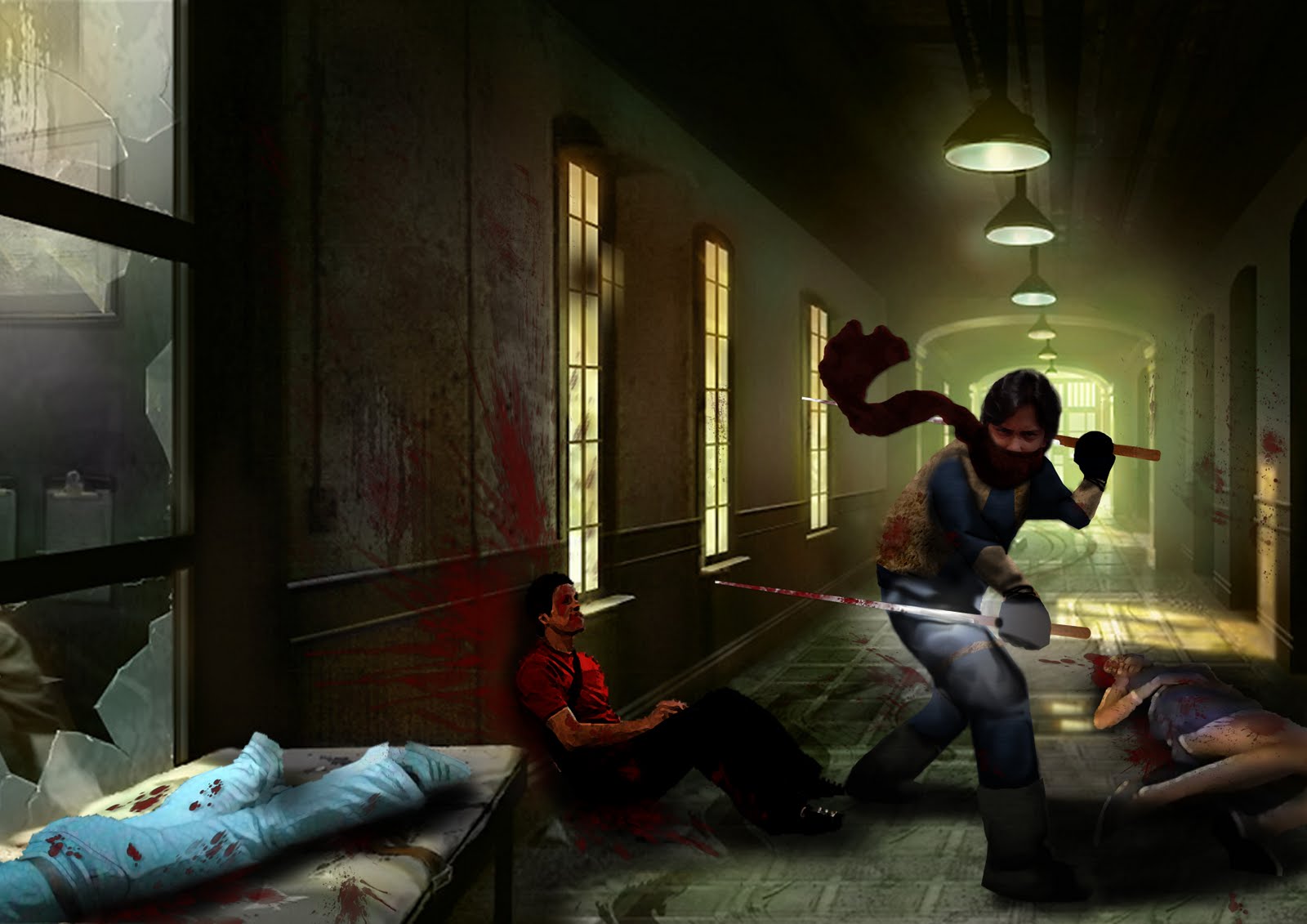
Zhaf the Ninja WIP

| Labels: , | Posted On Sunday, July 24, 2011


finished work is here:

click the image to enlarge

Zhaf the Ninja

| Labels: | Posted On


for class assignment where you are required to take photos of your classmate (decided through rock, paper, scissors) choose one that you like and 'manipulate' him into a superhero

WIP is here:

It's a Joke! Happy Friends' Day

| Labels: | Posted On


it'a s joke! if u can get what I mean. Dedicate to my great friends

simple photoshop work

The Bear is Mine: Final

| Labels: | Posted On


Photo Manipulation after long time. Specially dedicate to my bf Bryan and also to the great photo manipulators that I highly admired;

The Bear is Mine: Before and After

| Labels: | Posted On


Before and After comparing. Finalized one is here: http://ilicarriedoll.blogspot.com/2011/07/photo-manipulation-bear-is-mine.html

The Enchantress

| Labels: | Posted On


I don't thInk this is good but I will improve more later


Young Dante of Devil May Cry

| Labels: , | Posted On


Coincidentally, he is the younger twIn of the London Brothers n he is wearIng the Red Caot whIle his older twin brother Jason is wearIng the Blue coat!
Really makes them look lIke Dante n VergIl :rofl:

The original Jeremy London picture is here.


Devil May Cry (C) Capcom

Silent Hill Hometown

| Labels: , | Posted On


manipulating my hometown

testing using texture to manipulate

Another Photo Manipulation Early Attempt

| Labels: | Posted On


as the title goes, another early attempts. Playing around with layers. this time I played around with one photo to produce several effects

Photo Manipulation First Attempt

| Labels: | Posted On


my very first attempt of photo manipulation at school. maybe I should also said this is my first photoshop try ever-this is done by Photoshop CS2 btw, yep, it was waaaaaay long ago, and I haven't step my foot on university yet (hehe). just a simple try out on the layer properties :P